
The bad news…
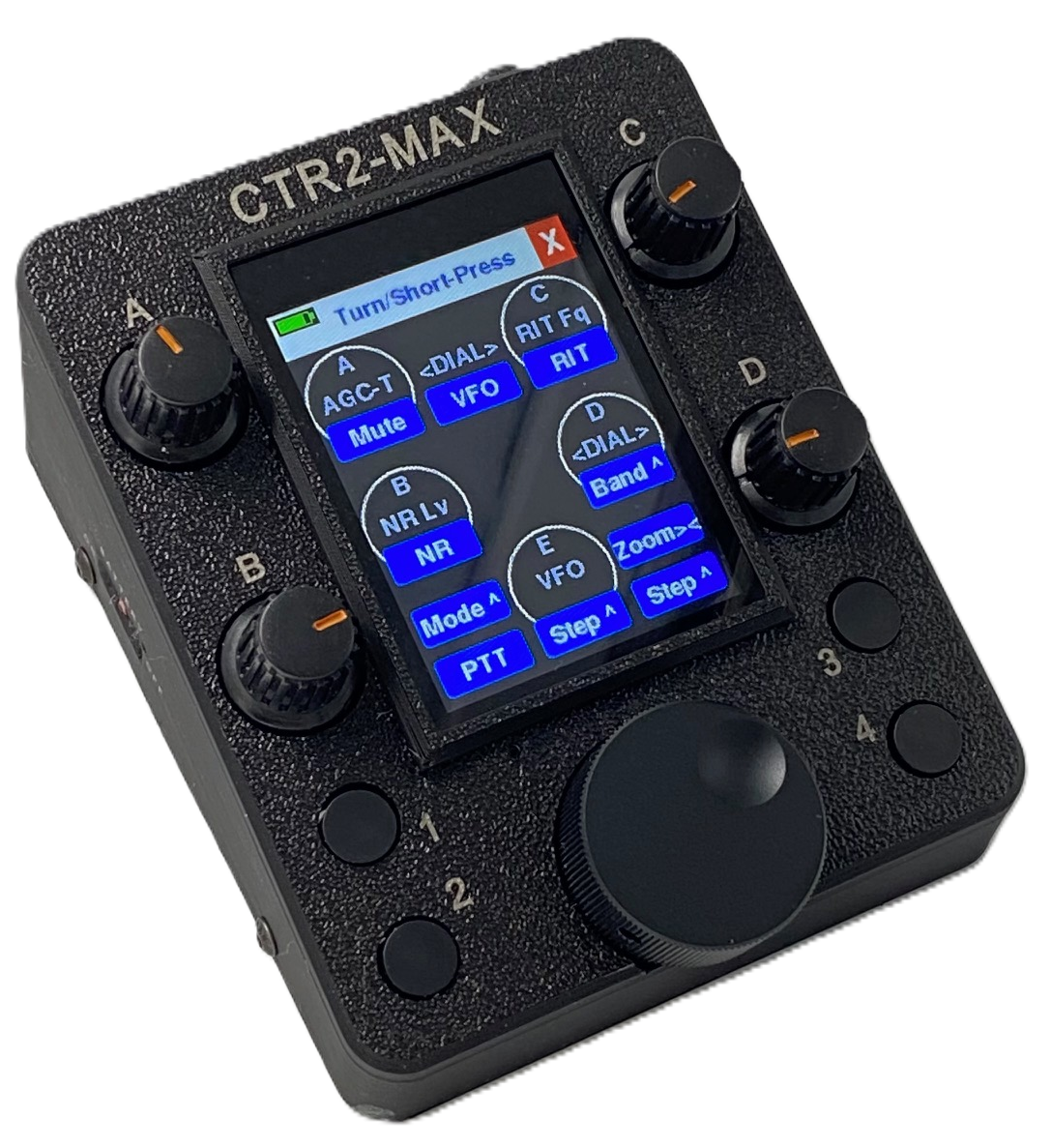
A recent push by the FCC to require FCC certification of all RF emitters sold in the United States caused me to re-evaluate the components I use to create CTR2 controllers since they use WiFi and Bluetooth radios (RF emitters) regulated by the FCC.
The Xiao ESP32C3 and ESP32S3 controllers that I use in CTR2-Micro and CTR2-MIDI controllers, along with the M5Dial I use in the CTR2-Uno/Duo/Quad controllers are FCC certified and I’ve added those certification numbers to the descriptions of these units in my shop.
Unfortunately, I have not been able to verify that the 2.8″ ESP32-S3 display I use in CTR2-Max is FCC certified. Nor can I find any ESP32-S3 2.8″ display on the market that is FCC certified. In order to sell these units in the United States and internationally, I need to remove both Bluetooth and WiFi functionality and use only USB to connect to the outside world. In other words, cripple CTR2-Max so that it is not subject to FCC and EU RF emitter certification.
Regretfully, as of CTR2-Max v1.02.00, CTR2-Max will no longer support Bluetooth MIDI control nor will direct Flex radio control over WiFi be possible.
This change only affects CTR2-Max. The other CTR2 controllers with FCC certified radios are not affected.
v1.02.00 will support USB MIDI, so if you’re currently using CTR2-Max in USB MIDI mode with any of Marcus’s (DL8MRE) apps, RimuSDR, or any of the other apps that support MIDI, nothing changes with this update.
I know this is not good news to many CTR2-Max users that use Flex WiFi mode, and I apologize for the sudden change in direction. I have temporarily suspended sales of CTR2-Max while I work on the new firmware to make it compliant.
The good news…
So what could possibly be good news? Well, a couple of weeks ago, Jeremy, KK7GWY, the lead developer of AetherSDR, purchased a CTR2-Max. After a couple of days, he reached out to me about a few ideas he had to improve it’s functionality.
First, he added a new feature to AetherSDR called CTR2 Relay. You can find it under the Settings->Controllers-CTR2… menu in the latest release of AetherSDR (v26.10.3). Selecting this option opens the following panel:
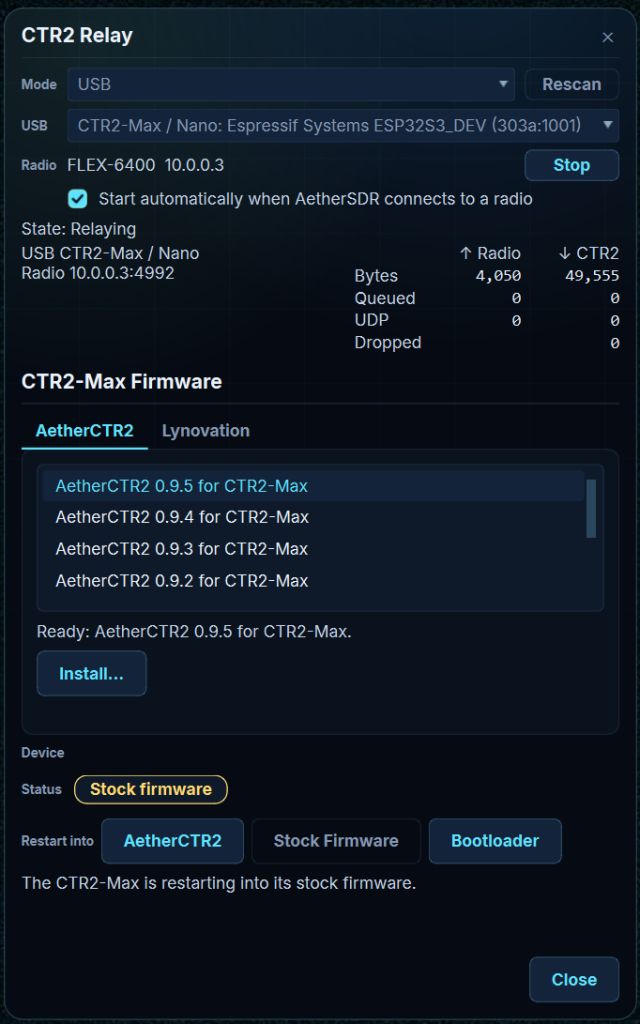
Here, you can select your CTR2-Max from the USB list box then click the Start button. If you have CTR2-Max connected to a USB port on your computer, and in Flex mode, AetherSDR will connect to the controller and provide a USB connection for it to your radio. It works just like Flex WiFi mode does on my other controllers, but without the WiFi. There is no configuration in CTR2-Max, or mapping in AetherSDR, required. This feature allows you to use the Flex mode Dashboard in CTR2-Max and provides a two-way “hardware knob and button interface” for AetherSDR and your radio. Like Flex WiFi mode on my other controllers, it works in parallel with the radio AetherSDR is controlling. And because AetherSDR has versions for Windows, Mac, and Linux, CTR2-Max works on all of these operating systems.
But that’s not all!
While developing the CTR2 Relay applet for AetherSDR, Jeremy created his own controller firmware called AetherCTR2. This firmware runs on CTR2-Max in place of my CTR2-Max firmware. It provides similar functionality as Flex mode in CTR2-Max firmware, but with a modern, beautiful user interface. It also supports additional features such as CW decoding and an audio spectrum scope that my firmware doesn’t support. The AetherSDR development team will be responsible for further development, support, and documentation of AetherCTR2. This means that it will automatically be updated by the team when new features are added to AetherSDR.
With CTR2-Max v1.02.00 firmware, you’ll be able to install AetherCTR2 on your CTR2-Max from the CTR2 Relay screen. Just select the version of AetherCTR2 from the CTR2-Max Firmware list that you want to install and click the Install… button. AetherSDR saves a full backup of the files on your CTR2-Max before it installs AetherCTR2, so you can always revert back to the original configuration.
Right now, you’ll need to force your CTR2-Max into Boot mode (by pressing and holding the Boot button, pressing and releasing the Reset button, then releasing the Boot button). Once installed, click the Start button on CTR2 Relay to start AetherCTR2. Click the Stock Firmware button to return to CTR2-Max firmware. Once AetherCTR2 is installed, a button in CTR2-Max’s Settings menu called Run AetherCTR2 will switch you back to AetherCTR2.
Once AetherCTR2 is installed on your CTR2-Max, you can easily switch between the two firmwares to run the firmware that works best for you.
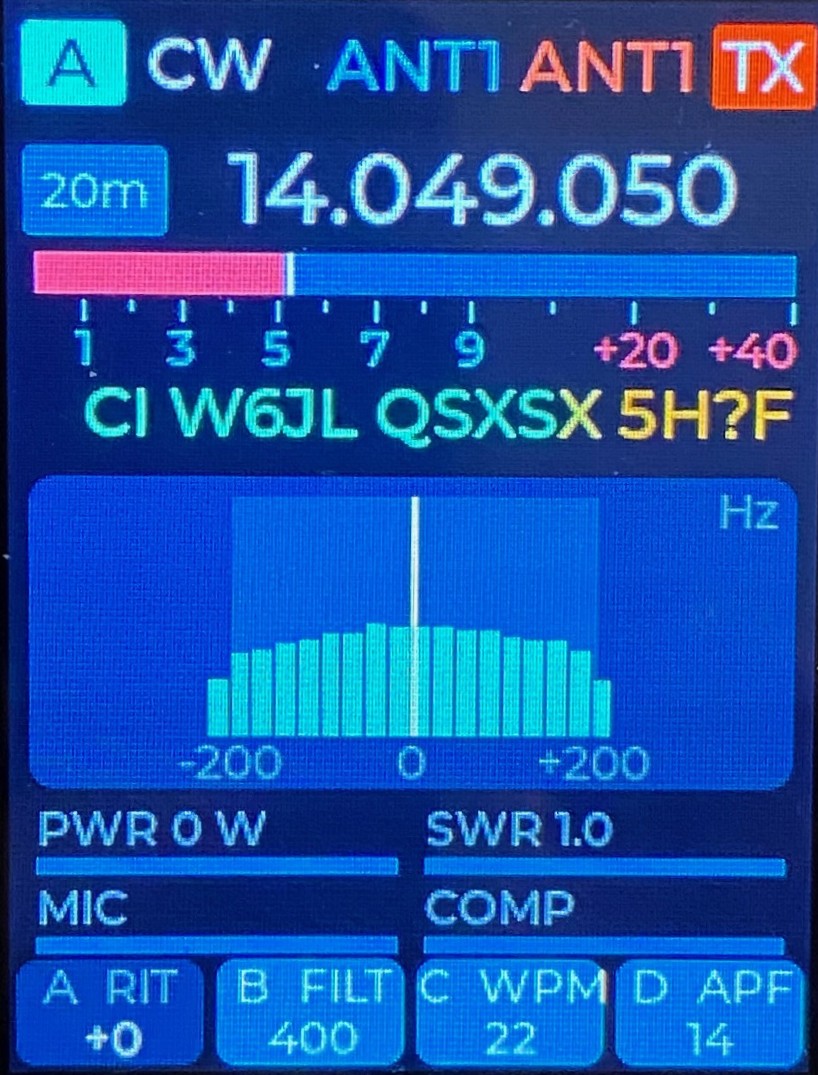
AetherCTR2 in CW mode with CW decode and audio scope enabled
And that’s still not all!
In the coming weeks, we’ll be working on removing the requirement to manually force your CTR2-Max into Boot mode to update its firmware.
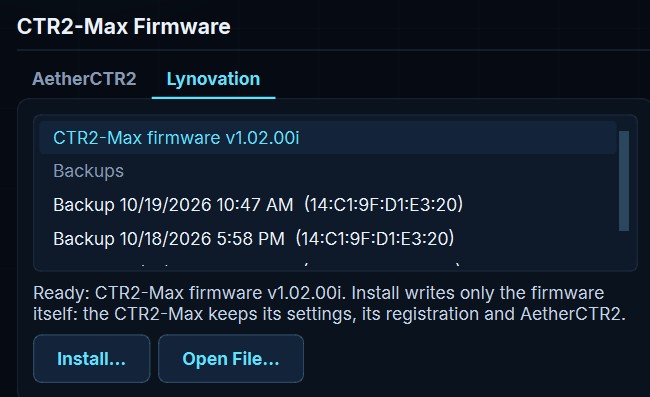
In addition, AetherSDR will support updating CTR2-Max firmware from the CTR2 Relay display. You’ll just need to download the CTR2-Max firmware update from this web site and click on the Open File… button on the Lynovation tab.
Next, select the firmware zip file you downloaded then click the Install… button. That’s it! No fussing with unzipping the file, using a flash program, or erasing your flash by mistake. This feature just updates the core CTR2-Max program and leaves everything else along.
In conclusion
I hope that the bad news about Bluetooth and WiFi removal in CTR2-Max has been balanced out by the good news about the new features and options provided by AetherSDR. I think AetherSDR support, and AetherCTR2 are game changers.
I’d like to thank Jeremy for the work he put into this. Nobody asked him to do it. He did it because he wanted to provide a gift for Lynovation and the amateur radio community. All I can say is “Wow! What a gift! Thank you!”.
73, Lynn, KU7Q